Thoughts From Eric Archive

Bahstahn: the Gathering

Published 17 years, 4 months past

The Robot speaks truth: I will be visiting the northern reaches of the greater Boston area in the first few days of February to do some client training (which is one of the many things I do).  To celebrate, I’ve managed to pull the Markup & Style Society (which of course includes that simplest of bits, the inestimable Mr. C.) out of hibernation, get them to link up with the Build Guild, and have the two jointly sponsor a gathering open to all who wish to join us.  Welcome to the social!

This massively meritorious meeting of minds will take place on 2 February 2009 in historic Salem, MA:  here’s the Upcoming entry with all the details and RSVP action.  If you plan to be with us, make your voice heard.  Or, if you’re the fearsome and mighty Windhammer, who rumor has it may also be there, bring forth thunder!  On the Upcoming page.

Hope to see you there!


Seeking JavaScript Help

Published 17 years, 4 months past

Even though it turned out that there is no simple solution for the math problem I posted, I learned a fair amount from the fantastic responses—thanks, everyone!—and eventually came up with a solution that worked for me.  (I’d like to say it was one of the iterative approaches posted, but none of them worked for me.  In the end, I brute-forced it.)  I’m hoping for a different outcome with my next question, which is about JavaScript.

Consider the following structure, which is a much-edited-down version of part of the HYDEsim code:

function Detonation(name,lat,lon,yield) {
    var scale = Math.pow(yield,1/3);
    var gz = new GLatLng(lat,lon);
    this.name = name;
    this.lon = lon;
    this.lat = lat;
    this.gz = gz;
    this.yield = yield;
    this.overpressure = {
        p30 : 0.108 * scale,
        p15 : 0.153 * scale,
        p10 : 0.185 * scale,
         p5 : 0.281 * scale,
         p1 : 0.725 * scale
    };
    this.psi30 = {
        radius: 0.108 * scale,
        overlay : {
            points: makePoints(this.gz,0.108 * scale)
        }
    };
    this.psi15 = {
        radius: 0.153 * scale,
        overlay : {
            points: makePoints(this.gz, 0.153 * scale)
        }
    };
    this.therm20 = {
        radius: thermDist(20,this.yield,0.33,conditions.visibility),
        overlay : {
            points: makePoints(
                this.gz,
                thermDist(20,this.yield,0.33,conditions.visibility)
            )
    };
    // ...and so on...
}

There are two things I’ve tried and failed to do.  And tried, and tried, and tried; and failed, and failed, and failed.

  1. Eliminate the redundant calculations of radii.  Note how I define a radius property in each case?  And then have to not use it when I create the overlay?  It seems like there must be a way to just define the value once for each subsection and then use it as many times as needed within that context.  How?
  2. How do I make it so that all those properties and overlays and such automatically recalculate any time one of the “upper-level” terms changes?  As in, once I’ve created a new Detonation object det, how can I set things up so declaring det.yield = 250; will trigger recalculation of all the other pieces of the object?  At present, I’m just blowing away the existing det and creating a whole new one, which just seems clumsy and silly.  I have to believe there’s a better way.  I just can’t find it.

Please note: tossing off comments like “oh, just instantiate a mixin constructor with an extra closure” will be of no help at all, because I don’t understand what those terms mean.  Hell, I’m not even sure I used the words “object” and “property” correctly in my explanation above.  Similarly, pointing me to tutorials that use those terms liberally is unlikely to be of help, since the text will just confuse me.  Sample code (whether posted or in a tutorial) will help a great deal, because it will give me something to poke and prod and dissect.  That’s how I’ve always learned to program.  Actually, it’s how I’ve always learned anything.

As well, I’m absolutely willing to believe that there are much, much better ways to structure the object, but right now I really need to learn how those two things are accomplished in the context of what I already have.  Once I get familiar with those and finish up some other work, I can start thinking about more fundamental overhauls of the code (which needs it, but not now).

I really appreciate any concrete help you can give me.

Addendum: if you leave code in a comment, please just wrap it in a code element and use whatever indentation you like.  The indentation won’t show up when the post goes up, but I’ll go in after and wrap the code in a pre and then everything will be fine.  Sorry to those who’ve already gone to the effort of posting with indents or nbsp entities to try to preserve indentation!  As soon as I can dig up the right preference panel or plugin to allow pre in comments, I’ll do that, but for now I’ll manually edit in the needed pres as comments are added.  THanks, and again, apologies to those who posted before I made this clear!


Seeking Math Help

Published 17 years, 4 months past

So I have this equation that’s great for finding one term.  Problem is, I need to solve for another term that’s scattered all across the right side.  I’m hoping someone here has the mad algebra skills I managed to lose in the two decades since I last took a math class and can help me out.

Here’s the original equation:

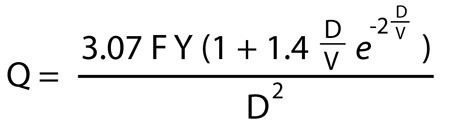
Q = (3.07 × F × Y × (1 + 1.4 × ((D/V) × e(-2 × D/V)))) / D2

I want to be able to solve for D, not Q; in other words, have a single D on the left and everything else on the right of the equation.  F, Y, and V are all variable terms; the e is the classic irrational constant.  I tried for quite a while to do this and ran very firmly aground.  The best I managed was this minor simplification:

Q = (3.07 × F × Y × (1 + 1.4 × (D / (V × e(2 × D/V)))) / D2

…and even that assumes that I did things correctly.  Here’s the original equation in pretty shoulda-done-it-in-MathML-but-oh-well form:

I can shuffle the chairs around, as it were, but never really get anywhere close to having a single D on the left.  “But it’s so easy!“, you may well be shouting.  That’s why you’re working for Google and I’m not.

I remember having questions just like this on tests back in college: “Given this equation, solve for blah”.  It’s been too long, though, and in all honesty I was never that great at this sort of thing in the first place. Help, please?

[Update 14 Jan 09]: several commenters have shown that what I’m trying to do is impossible.  Frustrating, but that’s math for you.  Looks like I’ll have to take another approach.


An Event Apart and HTML 5

Published 17 years, 5 months past

The new Gregorian year has brought a striking new Big Z design to An Event Apart, along with the detailed schedule for our first show and the opening of registration for all four shows of the year.  Jeffrey has written a bit about the thinking that went into the design already, and I expect more to come.  If you want all the juicy details, he’ll be talking about it at AEA, as a glance at the top of the Seattle schedule will tell you.  And right after that?  An hour of me talking about coding the design he created.

One of the things I’ll be talking about is the choice of markup language for the site, which ended up being HTML 5.  In the beginning, I chose HTML 5 because I wanted to do something like this:

<li>
<a href="/2009/seattle/">
<h2><img src="/i/09/city-seattle.jpg" alt="Seattle" /></h2>
<h3>May 4—5, 2009</h3>
<p>Bell Harbor International Conference Center</p>
</a>
</li>

Yes, that’s legal in HTML 5, thanks to the work done by Bruce Lawson in response to my href-anywhere agitation.  It isn’t what I’d consider ideal, structurally, but it’s close.  It sure beats having to make the content of every element its own hyperlink, each one pointing at the exact same destination:

<li>
<h2><a href="/2009/seattle/"><img src="/i/09/city-seattle.jpg" alt="Seattle" /></a></h2>
<h3><a href="/2009/seattle/">May 4—5, 2009</a></h3>
<p><a href="/2009/seattle/">Bell Harbor International Conference Center</a></p>
</li>

I mean, that’s just dumb.  Ideally, I could drop an href on the li instead of having to wrap an a element around the content, but baby steps.  Baby steps.

So as Bruce discovered, pretty much all browsers will already let you wrap a elements around other stuff, so it got added to HTML 5.  And when I tried it, it worked, clickably speaking.  That is, all the elements I wrapped became part of one big hyperlink, which is what I wanted.

What I didn’t want, though, was the randomized layout weirdness that resulted once I started styling the descendants of the link.  Sometimes everything would lay out properly, and other times the bits and pieces were all over the place.  I could (randomly) flip back and forth between the two just by repeatedly hitting reload.  I thought maybe it was the heading elements that were causing problems, so I converted them all to classed paragraphs.  Nope, same problems.  So I converted them all to classed spans and that solved the problem.  The layout became steady and stable.

I was happy to get the layout problems sorted out, obviously.  Only, at that point, I wasn’t doing anything that required HTML 5.  Wrapping classed spans in links in the place of other, more semantic elements?  Yeah, that’s original.  It’s just as original as the coding pattern of “slowly leaching away the document’s semantics in order to make it, at long last and after much swearing, consistently render as intended”.  I’m sure one or two of you know what that’s like.

As a result, I could have gone back to XHTML 1.1 or even HTML 4.01 without incident.  In fact, I almost did, but in the end I decided to stick with HTML 5.  There were two main reasons.

  1. First, AEA is all about the current state and near future of web design and development.  HTML 5 is already here and in use, and its use will grow over time.  We try to have the site embody the conference itself as much as possible, so using HTML 5 made some sense.

  2. I wanted to try HTML 5 out for myself under field conditions, to get a sense of how similar or dissimilar it is to what’s gone before.  Turns out the answers are “very much so” to the former and “frustratingly so” to the latter, assuming you’re familiar with XHTML.  The major rules are pretty much all the same: mind your trailing slashes on empty elements, that kind of thing.  But you know what the funniest thing about HTML 5 is?  It’s the little differences.  Like not permitting a value attribute on an image submit.  That one came as a rather large surprise, and as a result our subscribe page is XHTML 1.0 Transitional instead of HTML 5.  (Figuring out how to work around this in HTML 5 is on my post-launch list of things to do.)

    Oh, and we’re back to being case-insensitive.  <P Class="note"> is just as valid as <p class="note">.  Having already fought the Casing Wars once, this got a fractional shrug from me, but some people will probably be all excited that they can uppercase their element names again.  I know I would’ve been, oh, six or seven years ago.

    Incidentally, I used validator.nu to check my work.  It seemed the most up to date, but there’s no guarantee it’s perfectly accurate.  Ged knows every other validator I’ve ever used has eventually been shown to be inaccurate in one or more ways.

I get the distinct impression that use of HTML 5 is going to cause equal parts of comfort (for the familiar parts) and eye-watering rage (for the apparently idiotic differences).  Thus it would seem the HTML 5 Working Group is succeeding quite nicely at capturing the current state of browser behavior.  Yay, I guess?

And then there was the part where I got really grumpy about not being able to nest a hyperlink element inside another hyperlink element… but that, like so many things referenced in this post, is a story for another day.

Adoption Day

Published 17 years, 5 months past

Yesterday afternoon, in a small office on the second floor of the Cuyahoga County Courthouse in downtown Cleveland, Ohio, Kat and Carolyn and I finalized our adoption of Rebecca.  There were a few witnesses to this: the social worker who has handled our case from the outset, as she did Carolyn’s; the lawyer who made sure all of our paperwork was correct; our friends Gini and Ferrett; and the magistrate who conducted the proceedings.

As I did with Carolyn, I’ve avoided mention of Rebecca’s being adopted, though anyone who’s been reading the site for the last several years would probably have inferred it from the fact that Carolyn was adopted.  And as with Carolyn, I avoided saying anything because the adoption wasn’t legally final until yesterday.  Up to that point, we were borrowing her from the agency, as it were: they were her legal guardians.  It was possible at any point for the agency to remove her from our home.  In the strictest legal sense, they didn’t even need a reason to do so.  Ditto the state.  Had we missed one of the six monthly post-placement meetings with our social worker, for example, or even not met the required schedule, custody would have been revoked.

Now, of course, that’s no longer possible.  Now she is ours as legally as she has been emotionally, now judicially recognized as the part of our family she’s long since become.  It was her sister who made it official: the magistrate had Carolyn stamp the legal decrees, so that it was she who made the adoption permanent and binding.  Most of the witnesses choked back tears.  I felt a few eye-prickles myself, but suppressed them to make sure I got the pictures I hope both girls will cherish as they grow older.

After a celebratory dinner with friends, as we got ready for bedtime, I took Rebecca into my arms and whispered, “Welcome to our family, little one.  Again.  And forever.”


MW Latest Tweet 1.1b2

Published 17 years, 5 months past

Now available: MW Latest Tweet 1.1b2.  The only real difference between this version and the previous is better auto-link routines, thanks largely to a PHP4-ified version of Joseph Scott‘s recently released MakeItLink PHP class.  I tightened up some related code as well, thanks to my newfound understanding of just what the heck a “callback function” actually does, and how it can be useful.  And anonymous functions, too!

Also, there is an “enter debug mode” link at the bottom of the administrative panel for the plugin.  It’s very cleverly matched with an “exit debug mode” link when you’re in debug mode.  These links do just what they sound like they should do.  Debug mode itself, introduced in the previous beta, is unchanged (except maybe cosmetically).

In case anyone’s interested in seeing how I use the text-replacement strings on  meyerweb, here’s what I have in that textarea, formatted slightly for readability:


<div class="panel">
<h4>Recently Tweeted</h4>
<p class="more">
<a href="http://twitter.com/%%USER_SCREEN_NAME%%">see more</a>
</p>
<p>
%%TEXT%% <small>–tweeted %%CREATED_AT%%</small>
</p>
</div>

There were some reports of incompatibility between this plugin and early WordPress 2.7 betas.  Word is it’s working fine with the latest beta.  I probably won’t fix any incompatibilities until 2.7 final ships, but if anyone spots something they absolutely know will be a problem in 2.7 final, let me know.  Thanks!


Fixing Postcodes

Published 17 years, 6 months past

In case anyone’s interested, I finally updated the ZIP archive of all the countries and postcodes from the 2008 ALA survey.  The two files are sorted like before, but this time leading-zero postcodes haven’t had their leading zeroes stripped by Excel.  Oh, Excel.

I have learned way more about Excel’s “helpful” handling of CSV and text imports than I ever wanted to know.  The basic drill is, if you want to open a CSV or text file but don’t want Excel to be “helpful”, don’t drop the file onto Excel or double-click the file icon.  No no!  That would be too easy.

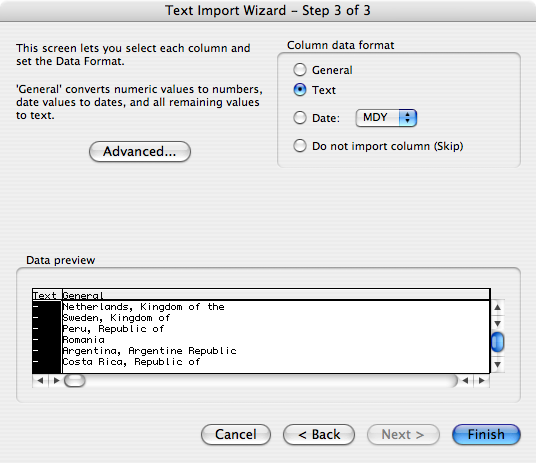
Instead, launch Excel, select “File > Open”, and then select the CSV or text file you want to open in the file browser.  Go through the Text Import Wizard carefully:

  1. Tell Excel that the file is delimited on the first screen.  (Or, if it isn’t, then don’t.  I bet it is, though.)
  2. Tell Excel what delimiter you’re using on the second screen.
  3. Then—this is the crucial bit—on the third Wizard screen, select the columns you don’t want Excel to “help” you with and set them to “Text”.  Be careful about setting all the columns as “Text”, though: if you have non-ASCII characters, Excel will “helpfully” replace their contents with octothorpes when you try to export the data later.  Such “help”!  It’s so “helpful”!

Yay!  An open file where the data is all in its original state!

Now you can save the file as an Excel workbook and it should (but please note my use of the word should) leave your data alone.  Ditto if you do “Save As…” to export to CSV or text again, which you might do if you run some calculations and want to capture the result in a basic, portable format.  But remember!  If you ever want to open those CSV/text files in Excel, you can’t just open them.  You have to go through the whole text-import process again.

So the survey files now contain actual useful data, especially for countries where postcodes can start with zeroes.  (Which is a lot of them.)  The files also have the usual bits of abuse that come along with daring to ask people to supply optional information, because I didn’t even try to filter that stuff out.  So, you know, naughty words ahead.

In part, I’m posting this to leave a record for anyone else who runs into the same problems I had, and also to remind myself of what has to be done next year.  Also to provide a heads-up to anyone who’d like to grab the fixed-up data and do fun mapping stuff with it, as did some commenters on the previous post.


Shock and Awe

Published 17 years, 6 months past

I almost feel like the Presidential election didn’t happen.

You see, for the entire second half of Election Day, from almost noon until after midnight, Eastern time, I was aboard a Continental flight to Tokyo.  We had video-on-demand systems but not live satellite television, so as we arced over Canada, Alaska, and the northern reaches of the Pacific Ocean, we flew in ignorance.  As Jeremy Keith put it regarding his own flight to Japan, we were aboard Schrödinger‘s Airplane.

For me, the wave collapsed as we began the initial descent toward Narita.  One of the flight attendants, having announced that they were starting the initial-descent procedures and would like us to check around our seats for any personal items we might like to start stowing, added:  “And for those of you interested in the results of the election, we have a new President: Barack Obama.”

There was a burst of applause from the economy section of the plane.  In business class, there was silence.

Well, not quite.  I was myself sitting in business class, thanks to a great big pile of reward miles and some lucky timing in calling the airline.  As I heard her say Obama’s name, I let out an involuntary “Wow“.  Because until that moment, deep down I had believed, truly believed, that Mr. Obama would not win the Presidency.  That was not the outcome I desired, but it was the outcome I expected.

I am in many ways ashamed of my doubts and fears, because I had thought less of my fellow Americans than they deserved.

Since then, from here in Tokyo, I’ve felt weirdly disconnected from what’s happened.  In time zone terms, I’m fourteen hours in my home’s future, half a day ahead of everyone back home.  But because I received word after it was all over and soon after slept through America’s Wednesday daylight hours, I feel like I’m a day behind.  Time and distance combine to create a feeling of disconnectedness from the end result, as though I’m getting word of election results in Germany or India or Australia: interesting, but something seen at a remove.

It’s odd.  I’m used to being an observer, but this is something else entirely.  I think it’s pure astonishment.


Browse the Archive

Earlier Entries

Later Entries