Posts in the Tech Category

I Miss PhotoBars

Published 20 years, 11 months past

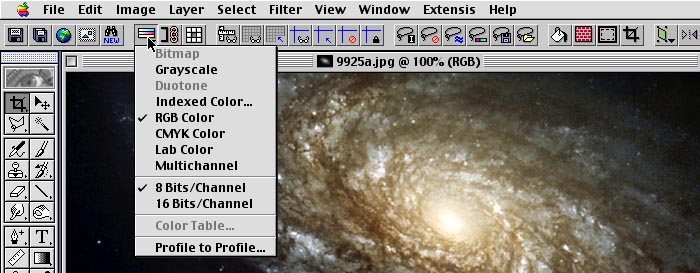
So I recently got my hands on a copy of Photoshop CS—yes, a legal copy—and have been playing with it over the past few days.  Here’s the thing: in my old Classic install of Photoshop 5.5, I had Extensis’ PhotoBars installed and it was basically like a slice of nerdvana.  Every function I commonly used was right there, ready for action, not hiding three levels deep in whatever menu Adobe saw fit to bury it.  Now if I want to transform a layer or switch color modes or resize an image, I have to go hunting.  It’s annoying, it’s time-wasting, and it shouldn’t be necessary.  Even if I trained myself to know exactly where every option lay in every menu, I’d still be slower than I was with PhotoBars, which offered me a fully customizable bar that gave one-click access to just about anything I wanted.

I found a single page regarding getting PhotoBars to work in Photoshop CS, but unfortunately it seems to be Windows-centric (given that the self-extracting demo is a .exe file).  Either way, it starts out with “install PhotoBars”, which I tried to do and got nowhere.  I then tried copying my Extensis stuff over from my old Photoshop install to the new one, and when I launched CS it cheerfully ignored all the new plugins I’d dropped into its folder structure.

And I should note that it’s entirely possible that CS has something equivalent built in, and I haven’t found it yet despite a look through the manual.  If I’m being blind, point me in the right direction.  If there’s third-party software that does this job, point me toward it.  In any case, I really, really want PhotoBars back, or at least something with equivalent power and customization.  Help!

Update: here’s an illustration of what I’m talking about…


New Design, New Feeds

Published 20 years, 11 months past

The visual design of meyerweb turned a year old on February 1.  As a little celebration, I’ve rolled out an update to the design.  In the past, I’ve thrown out entire designs for completely new ones, but not this time around.  This time, the changes are more of an incremental advance; or, if you prefer, a mutation of the previous design.  After all, the basic layout is the same as before.  I simply opened it up, allowing the various components more breathing room, and cleared away some of the clutter that had built up, such as the various “RSS 2.0” buttons.  (So how does one now get the feeds?  I’ll explain that in just a minute.)

There’s more to this than just a simple evolution, I admit.  The first major change is the addition of navigation links across the top of each page.  For some time now, a lot of the material that people come here to find was buried, difficult to find unless you knew where you were going, or else on what terms to search.  By pointing directly to the topic areas I think will most interest visitors, I believe the site is now much easier to use.

The second major change is the layout of “metainformation” for each post (and comments on posts). In this area, I was heavily influenced by Khoi Vinh’s Subtraction 7.0, and I definitely owe him a debt of gratitude and inspiration.  As will be evident from even a casual comparison of the two sites, I took a general design idea Khoi uses and adapted it to my particular situation.  I think it works rather well.

The third notable change is a feature addition that I’ve been planning to add for a couple of months now. New to the site is a Syndication Feeds page which brings together (dare I say it aggregates?) all of meyerweb’s RSS feeds.  The real step forward here is the debut of two new “Thoughts From Eric” feeds, including a feed of just technical posts and a feed of just personal posts.  Now all of you who just come here for the technical stuff, and couldn’t care less about the person behind the site, can restrict your feed to screen out the worthless drivel.  Similarly, those of you who know me personally but don’t understand the eye-glazing technical stuff can filter out the confusing nerdity.

Even better, each of the three “Thoughts From Eric” feeds (including the traditional “show me everything!” feed) comes in one of two flavors: summary or full content.  At long last, I’ll find out if providing full-content feeds drives my bandwidth consumption up, or eases it down.

I’ve also established a new Redesign Watch feed, which is something I know will be of interest to many visitors.

I made other small refinements throughout, and odds are I’ll continue to tinker for a little while.  Overall, though, I feel I met my goal of making meyerweb a more friendly site to visit, and a more feature-rich environment.  Explore, and enjoy.


S5 1.1b5

Published 20 years, 11 months past

And now, S5 1.1b5: try the testbed online, or download the 208KB ZIP file).  There is one functional change since S5 1.1b4: the Home and End keys now jump to the first and last slides, respectively, when in the slide show view.  In outline view, S5 will ignore those keystrokes (as it does all keys other than “T”) and allow the browser to do whatever it usually does.  This is actually an addition, as neither key was being used in previous versions of S5.

There is still a major conflict between S5 and the AdBlock extension for Firefox/Mozilla.  I don’t know what’s causing it, but I do know that if you’re running AdBlock and you load up an S5 presentation, you’re likely to find yourself trapped in the presentation, unable to use the back button or do much of anything else short of quit the program.  Don’t say I didn’t warn you.  I’ve started a thread in the AdBlock forum about it, and hopefully a solution will be found.  I will not delay finalizing 1.1 for this, however.  If a solution comes up after that and it calls for modifications to S5, then I’ll release a 1.1.1 version for AdBlock users.

A similar problem in Safari is still hanging about: in the outline view, the Page Up and Page Down keys are ignored.  I still have no idea why.  If anyone can find a solution, please let me know.

The PNG transparency fix introduced in 1.1b4 is still restricted to foreground images (i.e., those brought in via an img element).  In the default directory, there are two .htc files.  v1.1b5 uses pngbehavior.htc.  The other file, iepngfix.htc, can theoretically confer alpha-channel recognition to background PNGs in IE/Win.  I was unable to make this work, but the pieces are all there to experiment and find the fix I missed.  The behaviors need to be attached using addRule calls in slides.js; there’s one there already.  Hopefully a fix can be found in time to make it into 1.1 final.

Speaking of which, this is the last beta version before going final—I need to get it out the door so I can concentrate on other things for a bit.  Bug reports beyond the AdBlock problem are welcome, and fixes even more so.  I’m still open to feature requests for versions beyond v1.1, of course.


Password Production

Published 20 years, 11 months past

Since I’ve been futzing about with human-friendly security of various forms recently, it occurred to me that I ought to pass along a password-generation technique I’ve used for years now.  Maybe it’s a well known technique, and maybe not.  In any case, my best recollection is that I learned it from either John Sully or Jim Nauer back in my CWRU days.

The general idea is to pick a two-word combination you can easily remember.  For example, suppose you’re a big fan of pizza and Pepsi, and would have no trouble remembering those words.  Perfect: use them the basis of your password.  No, you don’t make it “pizzaPepsi”—instead, you interleave the words.  That would yield “pPiezpzsai”.  It looks fairly random, and yet is very easy to recreate because the seed words are so easy to remember.  If you have trouble remembering the exact sequence of letters, you can just write the words down on a piece of scrap paper and follow along.

In cases where your two words have different lengths, you can always tack on numbers.  For example, maybe your seed words are “milkshake” and “fries”.  That would normally yield “mfirlikesshake”, which is okay, but you could tack the numbers “123” onto “fries” to get “mfirlikessh1a2k3e”.  Alternatively, you could put the numbers at the beginning, so you get “m1i2l3kfsrhiaekse”.

I’ve found that when I start using a new password created this way, it takes me a few days to adapt to it.  I usually have the seed words written down some place handy during that training period.  Then my fingers take over, and from then on I can type it blindfolded in less than a second.  I don’t even think about the actual characters I’m typing: I just start, and the muscle memory kicks in.

So if you’re looking for a way to generate harder-to-crack passwords, there’s one possibility.  How about you—do you have any nifty human-friendly password-creation recipes?


S5 1.1b4

Published 20 years, 11 months past

As promised, I now draw back the curtain on S5 1.1b4 (try the testbed online, or download the 263KB ZIP file).  Here are the changes from 1.1b3:

  • “Meta” keys—function keys, command, control, alt, and option—should no longer be trapped by keys().  Thus, for those of you who discovered that you couldn’t use command-W to close the window in Firefox/OS X, that should be fixed; hitting F11 to invoke full-screen mode should also work; and so on, and so on.

  • While I was at it, I restructured keys() so that the only keystroke S5 pays attention to when in the outline view is “T”, to let you toggle back to the slide show view.  Anything else gets passed up by S5.  Despite this, Safari is still ignoring Page Up and Page Down while in the outline view.  I can’t for the life of me figure out why.

  • At the suggestion of Romain Herault, I’ve modified clicker(e) so that it will ignore clicks inside of embed and object elements.  This will allow you to interact with an embedded object, like a Flash file or a video, without advancing the slide show.

    I’m aware that some people have run into problems adding videos to their presentations, but I’m not at this point able to take on the task of analyzing the problems and figuring out potential solutions.  If someone else wants to work on fixes, there’s every chance I’ll be able to get fixes into the next version of S5, but very likely not this one.  I have a similar stance regarding the long pause of unstyled content while the presentation loads.  If someone devises a fix, I’ll study it for inclusion in the next version.  I personally don’t have a problem with the pause, but I realize there are those who’d like to eliminate it, and if it can be done without causing problems I’ll certainly add it.  Just likely not in this version.

  • PNG alpha channels are now honored in IE/Win, if only for img elements and not backgrounds.  You can see this happening on slide 5 of the testbed.  Woohoo!  This happens thanks to Erik Arvidsson’s pngbehavior.htc, a copy of which now resides in the default directory.  It may one day be replaced with IE7, but we’ll burn that bridge when we come to it.

    The one sort-of drawback to using this approach is that it seems to require that the call to pngbehavior.htc sits in an embedded style sheet, or else nothing happens.  This may very well have to do with the way the JavaScript monkeys around with external style sheets during startup.  If any of you IE/Win JS gurus can figure out a way to get the behavior to fire without having to embed it into the presentation, that would be stellar.  If not, it’ll just be documented as a “leave this in if you’re using alpha PNGs; otherwise you can take it out” thing.

One thing I’m still thinking about changing is the handling of the Home and End keys.  Right now, they move you forward or backward by one slide, just like the arrow keys and several others.  I’m thinking of making them jump to the first or last slide instead.  I’m hesitant because making the change means it would be much easier for a presenter to accidentally jump to the beginning or end of a slideshow with a single keystroke, and you can already easily jump to any slide by typing the slide number and hitting Return.  On the other hand, it’s a functionality that makes general sense, and it makes it much easier for a presenter to intentionally jump to the beginning or end of a slideshow with a single keystroke.  What are your opinions?

At this point, I would anticipate that 1.1 will have one more beta version to eliminate any bugs that are discovered as well as adopt any optimizations, and then it’ll go final.  I know there have been other feature requests (and may be more on this post, which is fine) but it’s really late in the beta cycle to add anything else.  Any new features will have a chance to get into the next version.


S5 Update

Published 20 years, 11 months past

I know it’s been a while since the last beta version of S5 was released, but between doing client work, flying to and from Albany (speaking of that, big ups to Dan “So Fine” Feinberg, Ed “The Shark” Skawinski, Ric “Darin” DiDonato, and the rest of the ITU Crew), diversions into PHP hacking, judging a markover contest, starting ballroom dancing classes, and spending time with my family, time has been a wee bit tight.  Things will only get worse once March rolls into town, so I’m going to try to push 1.1 into final status before February is done.

In the meantime, I wanted to point to some cool things that I’ve heard about with regards to S5.

  • S5 was adapted to create an online tour of Epocrates, a popular medical reference package for handhelds.  Kat uses it, as a matter of fact.
  • Ludovic Dubost, developer of XWiki, created an XWiki-based S5 creator, which you can read more about in his blog entry about it.
  • Pelle Braendgaard launched soapbx.com, a Web-driven S5 editor.  You can pick a theme, write the content in a wiki-like form, and get a slideshow.  It was apparently developed using Ruby On Rails.
  • Not quite ten hours after getting Pelle’s e-mail, a message from Lucas Carlson arrived regarding the creation of his own S5 creator: s5presents.com.  It too was developed using Ruby On Rails.
  • Earlier today, Eric Eggert reported that S5 got coverage in the German version of Internet World magazine.  I’m sort of hoping to see a scan of the article at some point.  (Is it copyright infringement if I possess a scanned copy but can’t understand what it says?  Just wondering.)  Update: I’ve seen a copy of the article, so there’s no more need for scans.

In other, less specific news, I know that people have created or are working on creating translators of one kind or another.  A popular request seems to be an OPML-to-S5 translator of some kind, and there’s always the Keynote-to-S5 idea.  So I’m going to throw open comments for people to post links to S5-related projects, translators, and what have you.  Heck, if you’ve recently done a presentation using S5, let’s see it, especially if you created a new theme.  Just please leave this post’s comment clear of bug reports or feature requests.  As of this writing, you can drop those on the S5 1.1b3 post, or else wait for the forthcoming post on 1.1b4.  I hope that’ll go up in the next couple of days, but no promises.


Gatekeeper In Perspective

Published 20 years, 11 months past

So when I said on Monday:

Got feedback?  Let’s hear it?

…what I actually meant was:

Got feedback about the code or how the package works once it’s installed in WordPress?  Let’s hear it.

I should have realized that otherwise, the comments would turn into an argument about comment spam, fighting it, ways the general idea could be defeated, and more.  Which they did.

Look, folks, despite what some people might tell you, I’m not so arrogant as to think that I could single-handedly solve the comment spamming problem for all time.  Even if I were, I very much doubt I’d be so clueless as to think that WP-Gatekeeper was that solution.  And if both those things were the case, I’m pretty darned near certain I would have very explicitly made the claim of having beaten the spammers.  Likely in big, boldfaced, red, capitalized, blinking letters, plus a background MIDI of “We Are The Champions”.

WP-Gatekeeper is not going to stop every possible comment spam attack, human or automated, for the rest of time.  Neither is any other defense you can name, without exception.  There may be measures that currently have 100% resistance to scripted attacks.  They will one day fail—I can pretty much guarantee it.  Even today, they are defeatable by actual humans sitting at computers and posting comment spam on every site they find.  That kind of spamming is very, very rare, but it happens.  I had such an incident within the last month.  If I hadn’t been keeping a close eye on new comments just then, I’d likely have missed it completely.

I’m fully aware that there are ways a spambot could defeat WP-Gatekeeper.  At the moment, none of them can.  That will one day change, of course, assuming challenges become at all popular.  Comment spam and the fighting thereof is a dance, a tennis match, an arms race.  Neither side will ever win.  As one side adopts a new tactic, the other side will move to counter it.  The countermeasure will itself be countered.  And so it goes.  Eventually, either spambots or spam defenses (or the two in combination) will become so advanced that they’ll gain self-awareness, and then we’ll all be royally hosed.

I know this.  You know this.  Let’s move on from there, okay?

In the end, the goal is to add another arrow to the quiver at the disposal of spam fighters.  Think this approach is wrongheaded, annoying, or otherwise pointless?  Fine.  Don’t use it.  For those who want to add this kind of capability—and since I instituted it on meyerweb, I’ve had not a single piece of spam make it onto the site or hit the moderation queue, whereas in my pre-defense days, I’d get at least twenty every day—then the package is there.  You can combine it with other defenses, if you like, for even more coverage.  I may upgrade it in the future, depending how far I get in learning PHP, mySQL, and form handling, and what feedback I get from people who know PHP better than I do.  I may not, in which case the system as it stands is effective, and probably will be for a while.  Even if I do one day abandon further development, the code is out there for someone else to improve if they so choose.

In the meantime, if there’s anyone who is using WP-Gatekeeper or has looked at the code, and has feedback on the coding or the way it works for the administrator of a WP blog, please feel free to share.  Also, if anyone can point me to an example of PHP code for collecting all of the HTTP_VARS that are returned by an XHTML form and then looking through them, even when the variable names aren’t necessarily known ahead of time, I’d really like to see it.  Thanks.

WP-Gatekeeper

Published 20 years, 11 months past

In my post on rel="nofollow", I mentioned the use of easily human-comprehensible challenge questions like “What is Eric’s first name?” as a way to defeat spambots.  There were two points made in the comments that I had considered but hadn’t brought up, given that they were tangential to the point of the post.  They were:

  1. Spammers could set up a database of questions and answers used on sites.  They might or might not share it with each other, but the point is that if I set up “What is Eric’s first name?” as the sole challenge, the human running the spambot could build the ability to answer the question into the spambot, thus defeating it.  Quite true.
  2. In order to make it more difficult to do this, there could be a set of challenges from which one is picked randomly.  So I might have three challenges asking for the first names of myself, Kat, and Carolyn.  Every time a comment form is delivered to a browser, one of the three challenges, picked at random, is included.  This would make it more difficult for a human spammer, since he (or she) would have to find all of the challenge questions. work out the responses, and build them all into a database, keyed to each site’s domain.

So over the weekend, I built as a proof of concept (and also as an exercise in learning more about how PHP, mySQL, and WordPress work) a WordPress package to do what described in the second point above.  It’s called WP-Gatekeeper, available from my WordPress Tools page, and if you’re brave you can give it a try.  Why brave?  Because the installation involves hacking a few WP files and adding a new entry to the admin menu, not to mention firing up a plugin.  And if you do it in the wrong order, you can break commenting for a short period.  There are DIY installation instructions on the WP-Gatekeeper page, for those who still want to proceed.  You also need to be brave because if you install it, you’re running code written—well, actually, adapted—by someone with only beginner-to-intermediate PHP skills.  I’ve been testing it locally and everything seems fine, but this is even more “use at your own risk” software than usual.  Got it?  Good.

Accordingly, WP-Gatekeeper is currently considered beta software.  I’m making it available now in the hopes that people more experienced than I with PHP and WordPress can take a look, hack on the code, and make it more efficient and the whole package easier to install.  I’m already aware that in WP 1.5, adding the admin page is much easier and doesn’t require hacking files, but I wrote WP-Gatekeeper in 1.2 and want it to work there, since that’s the latest public version.  Thus, any optimizations should work in 1.2.  When 1.5 (or whatever the next version number is) comes out, then I’ll worry about it.

Of course, there’s still nothing that prevents a spammer from registering questions and answers into a database, but the admin page makes it easy for a blogger to add, remove, modify, and re-key the challenges.  That will make tracking them more difficult, so long as a blogger puts effort into maintaining the list of challenges.  It gets back, in the end, to maintaining your blog.  The more maintenance you put into something, the better its shape will stay.

I’m also interested in suggestions for how the overall system could be made harder to bypass with a bot, and easier for a WP admin to run.  One feature I plan to add before going final is the ability to have the keys replaced on a regular basis, with the interval (daily/weekly/monthly/etc.) set by the admin.  The  other driving consideration here is that the system should be fully capable of working even if JavaScript is disabled.  It’s an accessibility thing; just go with me on this.  (Accessibility is the main reason I did this rather than install an image CAPTCHA solution, as it happens.)

Got feedback?  Let’s hear it.


Browse the Archive

Earlier Entries

Later Entries